
When I first started blogging I had no idea about the technicalities of it all. I suppose I was naïve to it and that is absolutely fine in the beginning. However, if you are going to start to take blogging seriously then you need to start taking the technical side seriously too.
You may be sitting there thinking your blog is only a hobby and therefore this doesn’t apply to you. Do you accept items for review? Yes? Then you still need to pay attention.
 Whether you are reviewing an item or writing sponsored content, you need to know about ‘follow’ and ‘nofollow’ links. If you don’t get it right then Google may penalise your blog- nobody wants to annoy Google, right?
What is a ‘follow’ link?
When Google bots trawl through your site they will follow all of the links you have embedded into your posts, to see where they lead. So you may link back to your own content (which is great by the way, you should do that as much as you can) and you may also have links going out to other blogs. Every time you include a link it is like giving a personal endorsement to that site. So that is obviously great for your own site (your site is awesome!) and great for supporting other blogs that you love!
So what about links to brands? Ok, so if you absolutely love a product and you want to rave about it then absolutely use a ‘follow’ link. Endorsing products is fantastic and we all love to hear an honest opinion. The problem arises when you have been sent an item, Google doesn’t like false recommendations.
Using ‘nofollow’ links
When you are sent an item you are, in effect, being paid in kind. Therefore, when you write a review, good or bad, you are only leaving that link for the purpose of the review. Google doesn’t like this and if they should see it, they will penalise you and the brand.
What does this mean? It means they could exclude you from Google search results and worse still, if you are using Blogger (owned by Google) your blog could be taken down completely – I have seen this happen!
To get around this problem all you have to do is make the link ‘nofollow’, this means that when the Google bots trawl your site they will come to a dead end, they will not follow through to that link. Simple.
How to add in the ‘nofollow’ links
There are two ways to do this, first is to manually add it which some people prefer. This isn’t too difficult though, just a bit tedious. When you insert a link, convert to the text/html view of the post and add in rel=”nofollow” to the html code.
So, if I had ‘tester text’ with a link attached to www.whatkatysaid.com it would look like this.
With a follow link (default): <a href=”http:// www.whatkatysaid.com “>tester text</a>
With a no follow link inserted: <a href=”http:// www.whatkatysaid.com “ rel=”nofollow”>tester text</a>
Now, if you are using WordPress there is a great plugin called ‘Ultimate Nofollow’ which means only having to tick a box to make a link no follow. EDIT This plugin does not work with the latest WordPress update. However, the absolutely amazing Zoe has created a work-around- find it here. Her advice is to disable the above plugin if you have it but keep it installed in case it gets fixed. For now her update will work in exactly the same was as shown below.
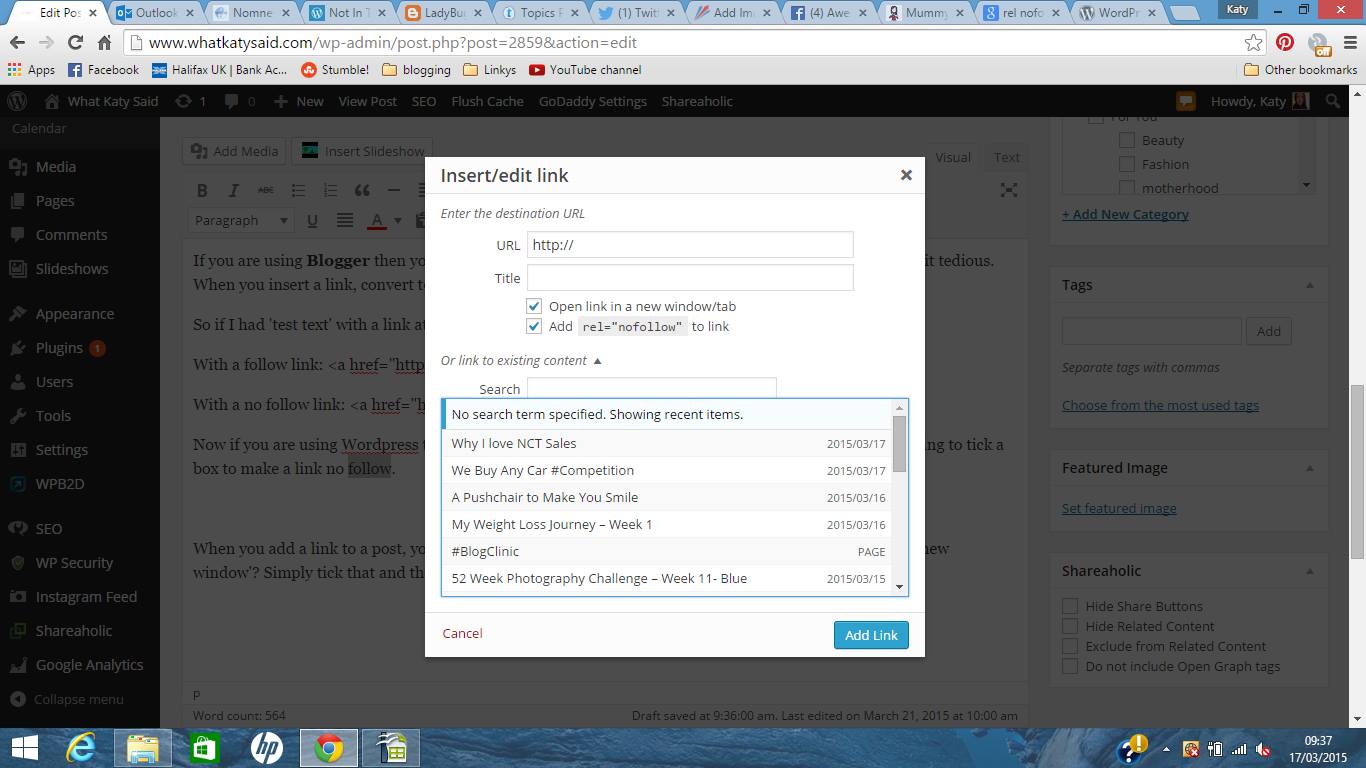
When you add a link to a post, you use this box- can you see the little tick box added beneath ‘open in a new window’? Simply tick that and the job is done for you! Easy!
If you are on Blogger there is no need to add a plugin of course. When you get to a bit of text you want to hyperlink then you just click on ‘link’ along your toolbar and within the popup you will have the option to ‘Add ‘rel=nofollow’ attribute’. This works in the exact same was as described above. Easy!
So, next time you add in a link just think, am I endorsing this site because I want to? Or am I adding the link because I was sent something in return?
 Do you have a question for the #BlogClinic?
Mia
Wednesday 10th of October 2018
I've never tried to "prove" it, but it's a recurring theme in my work. Sites with quality nofollow links - and not much else - seem to do OK provided everything lines up in terms of quality, relevance, etc.
Sam
Thursday 11th of January 2018
Thank you for this simple guide! I am relatively new to all this blogging stuff so guides like this are fantastic for me!
Rachel
Monday 23rd of October 2017
I'm on wordpress and I use a plugin called 'Nofollow case by case'. it's really easy to use x
olivia m
Thursday 8th of June 2017
ooo this post was so helpful! thank you!
Amy
Thursday 8th of June 2017
This is super handy and easy to understand, thank you I've been so confused on the whole topic! ?