
Inside: Review of the Nighthawk M5 5G WiFi 6 Mobile Router. Press sample provided.
As a society we are constantly plugged in, constantly connected. So when wifi fails or isn’t steady, it can cause frustration. If you live in an area with poor service or travel to various locations regularly and need reliable 5G, a Nighthawk mobile router may be the answer.
The Nighthawk M5 Mobile Router provides 5G internet either as a fixed-line router or as a portable unit using a SIM card. With Wi-fi 6 you can rely on fast speeds wherever you are, without needing a power supply.
The post will walk you through the features and benefits of the Nighthawk M5 from Netgear.
What is included in the box?

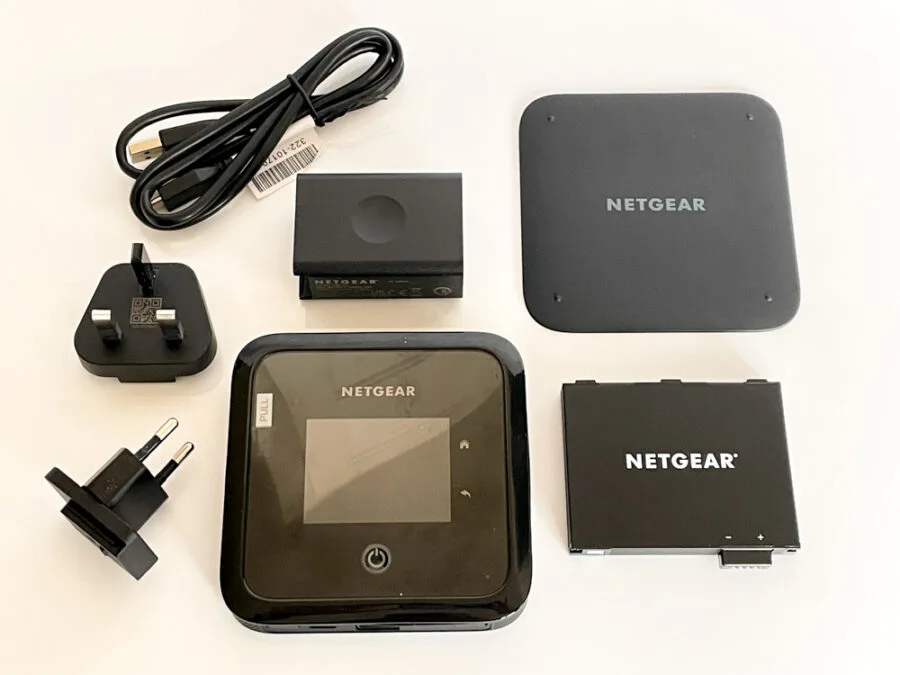
- Nighthawk® M5 Mobile Router device and battery
- Quick start guide
- USB-C cable
- Quick Charge AC adapter
Nighthawk M5 Features
- Super fast 5G speeds.
- Wi-Fi 6 for up to 32 WiFi devices
- Fixed or wireless options
- Secure and reliable network VPN pass-through support and password protection
- 13 hours use on a single charge or use a power socket for non-stop use.
- Netgear mobile app
Specifications
- Dimensions : 105 x 105 x 21.5mm (4.14” x 4.14” x 0.85”)
- Weight : 240g (0.54lb) with 5040 mah battery
- Latest 5G Technology: 5GNR Sub 6 GHz (NSA). Supports LTE CAT 20, LTE Advanced, 4×4 MIMO, 256QAM.
- Connect up to 32 devices.
- Qualcomm SDX55
- Max Theoretical download Speeds : Ethernet : Close to 1Gbps. WiFi : 11ax can support up to 1.2Gbps
- USB 3.1 Gen-2 tethered/Sub 6 NSA : Close to 3Gbps
When would a mobile router be necessary?
Rural areas will often have poor internet coverage, leaving your home internet with slow unreliable speeds. Using a mobile network as your primary internet connection will ensure you have 5g signal for the entire family to enjoy wirelessly.
Similarly, if your business is based in an area with poor internet access, Netgear’s Nighthawk M5 allows up to 32 WiFi devices to be connected, giving you premium performance for all employee and client devices.
Simply connect the mobile router to your existing home router to take advantage of faster speeds and reliable internet connection for all devices connected wirelessly or via a fixed cable connection.
Another reason to invest in a mobile router would be if you regularly travel and need access to WiFi on the move. Or perhaps you want to stay connected while away on holiday in remote parts of the country. You can of course connect to your mobile phone hotspot but this drains your phone battery and doesn’t necessarily provide a good signal.
By using a mobile router, you get greater capacity compared to your phone’s mobile signal strength, while having 13 hours of battery life before needing to charge the device at a power source.
Getting started
Setting up your Nighthawk router couldn’t be easier. Simply buy a SIM with a good data plan, insert it into the slot in the back of the device, slide in the battery and snap the back casing in place.
The M5 comes with a little charge, so you can turn it on by pressing the power button and configure the settings to meet your requirements.


You’ll be asked which language you’d like, before being prompted to choose an admin password. And that’s it!
You will be shown the device’s WiFi credentials (WiFi name and password) so that you can join its network and you’re good to go, whether that is by connecting via an ethernet cable or wirelessly.
Additional options
You are able to use the touchscreen to access various options. One of which is being able to manage the number of devices connected at any given time. From here you can set parental controls – allowing you to limit access from certain devices and set schedules to avoid 24-hour access for the kids mobile phones and tablets etc…


You can also change screen brightness, check battery life and monitor the network status and WiFi speed at a glance.
Our experience
Our home WiFi isn’t particularly good but has been improved significantly since we started using the Orbi WiFi 6 mesh system. I wanted to see how a mobile router would compare, both to our fixed cable connection and to my iPhone hotspot.
Our fixed home internet showed download speeds of 272.06 Mb/s and 25.84 Mb/s for upload speed. Again, this didn’t used to be the case before we had the Orbi mesh in place as the signal just wasn’t good enough to get coverage all over the house.
Now, if I didn’t have good coverage I would have to hot spot from my phone. Well, I managed 15.45 Mb/s for downloads and 3.77 Mb/s for uploads. Which is obviously a terrible set of numbers and wouldn’t be any good if you were trying to do work all day
So how did the M5 deliver? Obviously the figures will vary depending on where you are in the country and whether you have 5G coverage in your area (defaulting to 4G if not) but I was able to register 190Mb/s for downloads and 18 Mb/s for uploads.
Considering it was using the same SIM as my mobile phone, the difference is incredible. Everything loaded seamlessly, no buffering or delayed picture painting at all.
Final thoughts
If you will only need a mobile connection on the odd occasion then you’re better off using the convenience of your smartphone hotspot. But if you live in a remote area with poor service or regularly do work on the go with a need for a reliable internet source, then it is definitely a great option.
It is lightweight and compact, simple to use and provides a fantastic mobile broadband experience. To find out more visit netgear.com.