
Inside: Netgear Orbi 960 Quad-Band WiFi 6E mesh system review. Press samples included.
With more and more people working from home now, the need for a fast and reliable internet connection is greater than ever. Plus, households now have more devices connected to their wi-fi network than ever before, so a dodgy system just won’t do.
Netgear have produced the Orbi 960 Quad-Band WiFi 6E mesh system to ensure that your household consistently has great coverage, throughout the home. Whether you are upstairs, downstairs or down the bottom of the garden, the Orbi system has you covered.


We have been putting the Orbi 960 through its paces to see how it stacks up against its predecessor, but also to see how it copes in our new home with long garden.
Why would you need a mesh system?
The main reason people purchase a mesh system is for the coverage you get as a result. Instead of relying on your service provider’s standard router to transmit wi-fi around your home, the mesh system uses a network of satellites to boost the signal everywhere.
So, instead of one router, it is a little like having a router in various parts of your home – each sending out the wi-fi signal for you to hop onto. This means you don’t have any more dead zones where you can’t use your home wi-fi, so everyone in the household is happy.
There are other benefits too though, with the Orbi mesh system the signal is boosted so that you get amazing speeds every time – perfect for video calls, gaming, or streaming your favourite movies. Plus, with such a reliable connection and fast speeds, you don’t have to worry about having too many devices connected at once – there is room for everyone, with a great experience for all.


Benefits of the Orbi 960
The Orbi 960 Quad-Band 6E system is a major step up in terms of delivering service – if you need a wide coverage and even faster speeds then this is the system for you!
The first thing to mention is the distance covered – 7,500 square feet. That is a large claim but it really does stretch as we have tested it. If you have a large home or you have a business that requires coverage and a great signal strength across a large area then this is well worth the investment.
Speed is another feature that ticks all the right boxes, with capabilities for 6E-ready devices, delivering the latest wi-fi speeds up to 10.8Gbps which is amazing!
The mesh system can have up to 200 devices connected at once and also allows you to create 4 separate networks to make sure everything is streamlined and organised on the overall network.
What’s in the box?


- Orbi Router (RBRE960)
- 2m Ethernet cable
- Power adapter
- Quick start guide
As well as the main router, you can choose whether to have 2 or 3 satellites as part of your pack. And then of course you can get extra satellites should you need them for your home network.
Product specifications
- Unit dimensions: 11in x 7.5in x 3.3in
- Weight: 3.0lb
- Antennas : Twelve (12) high-performance internal antennas with high-power amplifiers
- Beamforming : Implicit & Explicit Beamforming for 2.4GHz, 5GHz & 6GHz bands MU-MIMO
- Processor : Powerful Quad-Core 2.2GHz processor
- AXE11000 Quad-Band WiFi : Orbi AXE11000 Router
- Router Ports : One (1) 10Gbps Multi- gigabit Ethernet port
- One 2.5Gbps Multi-Gigabit Ethernet LAN port
- Three 10/100/1000Mbps Gigabit Ethernet LAN ports
- Memory : 512MB NAND Flash and 1GB RAM
- Standards-based WiFi Security (802.11i, 128-bit AES encryption with PSK).
- Supports WPA3
- Guest WiFi Network
- NETGEAR Smart Parental Controls™
- Works with Amazon Alexa and the Google Assistant
- Backed by the NETGEAR limited 2-year Hardware Warranty.
Product design
The units are not small, measuring in at 11in x 7.5in x 3.3in each, so are not something that can easily be tucked away out of sight. However, they aren’t unsightly and can be neatly stored on a shelf or at the back of a desk area. You can get either the white with chrome trim as we have or the black version, which may fit better with your other tech around the home.
Another thing to mention is the lack of blinking lights – something that can be a nuisance and distraction to many – especially if you have one in your bedroom. Instead, the Orbi simply has one light strip that indicates power and status which isn’t too obtrusive at all.
Setting up the system
There aren’t lots of different components to make the set-up process difficult or complicated, it is essentially a plug and play system. All you need is the Orbi app and you can begin.
If you don’t already have a Netgear account then you will need to set one up, but once logged in you just have to click to set up a new Orbi system.


All you have to do then is scan the QR code on the front of your Orbi router and the app will guide you through the process.


Once you are up and running, you can transfer all of your smart home devices over to your new Orbi network using the password you chose during the set-up process.
Netgear mobile app
As with the previous models, you can also use the app as a device manager. The best thing about the app is that it is free to use and so are the main features.


As a family, we want to ensure our children are not spending too long on devices. At the moment we don’t have to police screen time at all but in time, when they have their own phones and other devices, we will most definitely be making use of the parental controls.
In this part of the app you can set up a profile for each child, add their devices and then pause their connection to the internet at any time. You can upgrade to premium to have the ability to track their internet usage, set time limits for usage and block certain websites.


Another great feature is the Guest Network option and is something we will be setting up in a few weeks for a party we are hosting. If you are happy to, then of course you can share your family wifi password with your guests but sometimes you might not feel totally happy doing that. So, the app allows you to set up a guest network and password to share, with the ability to remove access afterwards – so clever and so useful!
The app also offers access to Netgear’s security features and when you first purchase your mesh system you get a 30 day free trial to try out the benefits.
The app’s ease of use really does enhance the Orbi system and makes what is actually a complicated bit of kit really very user friendly and accessible.
Our experience
Our new home is an 1930’s build, a fairly large house with thicker than average walls and lots of twists and turns between rooms – a nightmare for the average wifi system. We also have a 140ft garden with a home office right at the bottom – a logistical nightmare with the wrong kit. However, with our Orbi mesh network up and running we have had absolutely no issues with wi-fi coverage at all.


We have the main router in the living room at the front of the house, with a satellite at the back of the house and another upstairs. When I first set them up it took a while for them to connect and I wondered whether our home had pushed it to its limit, but no – the status light turned blue and the signal is strong throughout.

We live in the middle of nowhere (we don’t even get 3G mobile signal!) and our devices aren’t new, yet we still manage to get on the 5-ghz band from the front of the house right down to the bottom of the garden, meaning we can work from home with ease and everyone in the household can have great Orbi wifi.
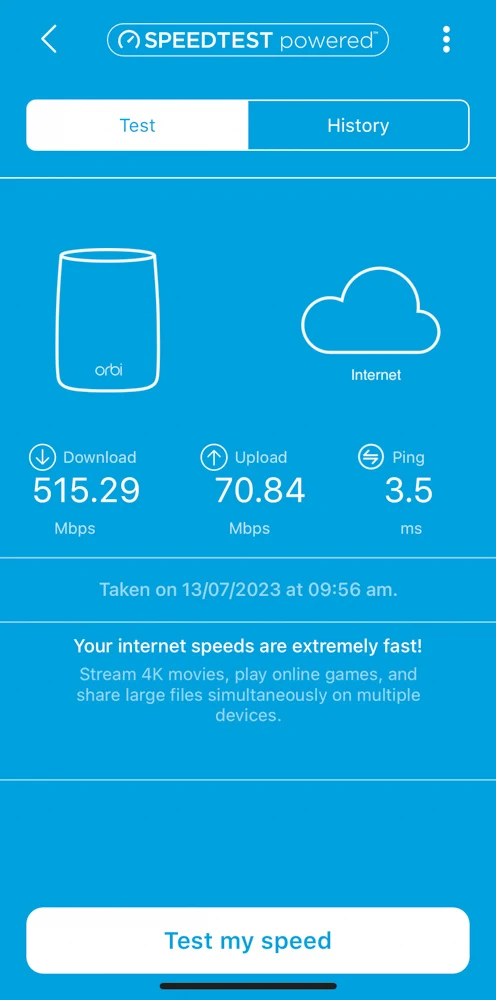
I ran a speed test and was so happy to see that we were achieving download speeds of 500+ and upload speeds of 70+ which is amazing for where we are and for our needs as a family. I can 100% recommend the Orbi system if you need a steady connection
Take a look at the Orbi mesh systems at netgear.com/uk